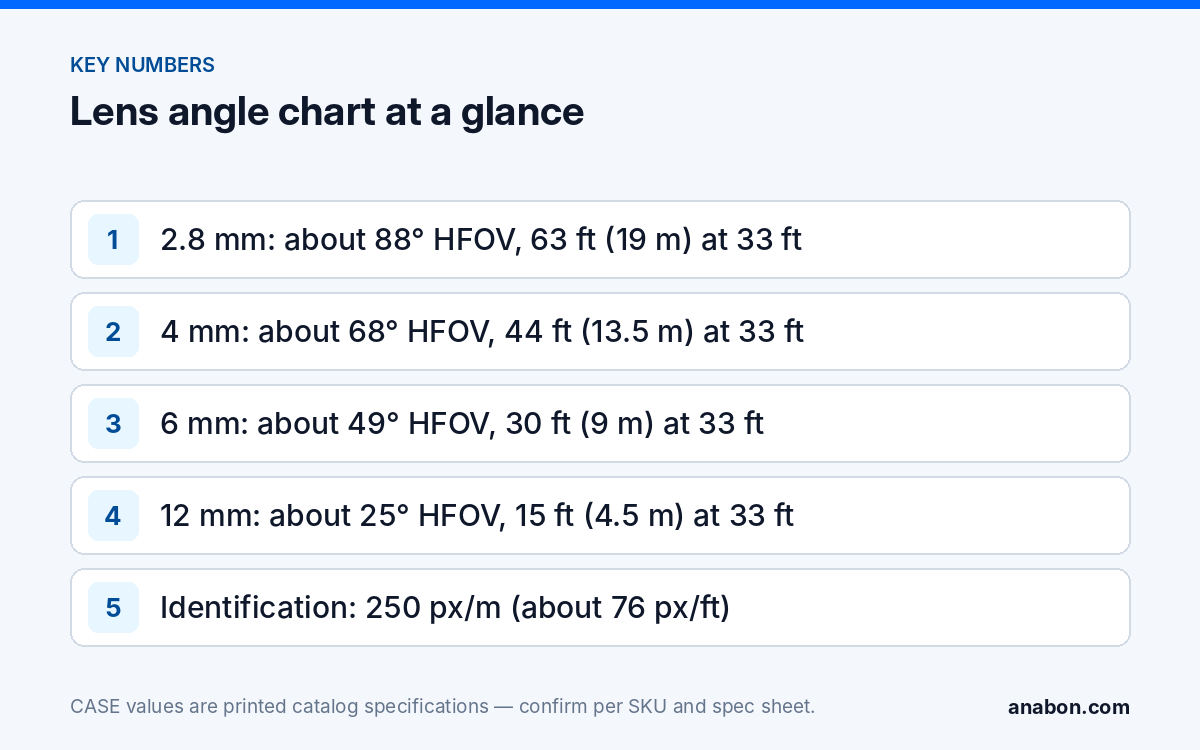
Quick answer: A security camera lens angle chart is only usable when it states the sensor it was computed for. On a nominal 1/2.7-inch-class sensor, a 2.8 mm lens sees about 88° horizontally, 4 mm about 68°, 6 mm about 49° and 12 mm about 25°; at 33 ft (10 m) that is a scene roughly 63 ft (19 m), 44 ft (13.5 m), 30 ft (9 m) and 15 ft (4.5 m) wide. Divide the camera’s printed horizontal pixel count by that width for pixels per foot, then read it against the DORI levels below. The angle printed on the SKU’s spec sheet always wins over this chart.
Why does the chart need the sensor, not just the focal length?
Two cameras with the same 2.8 mm lens can show different scenes, because the angle depends on the sensor width behind the lens: horizontal field of view = 2 × arctan(sensor width ÷ (2 × focal length)). For the distances in this chart the thin-lens shortcut is close enough: scene width ≈ distance × sensor width ÷ focal length. A wider sensor behind the same focal length means a wider scene and fewer pixels on every target.
Sensor formats differ: this chart uses a 1/2.7-inch-class sensor at about 0.21 in (5.4 mm) wide; a 1/1.8-inch-class sensor is about 0.28 in (7.2 mm). Spec sheets often print a wider angle than the formula gives, because wide lenses show barrel distortion and 16:9 sensors use a wider active area; a wider printed angle means a wider scene and fewer pixels per foot than this chart. The catalog page of a CASE camera prints the lens (“2.8mm Fixed”, “Motorized 2.8-12 mm”) and the resolution, not the angle; the angle is on the SKU spec sheet. Shortlist a focal length with this chart on the site walk, then confirm the printed horizontal angle before it goes into the camera schedule.
Horizontal field of view by focal length (nominal 1/2.7-inch-class sensor)
All values below use a 0.21 in (5.4 mm) sensor width. The vertical angle is smaller on every 16:9 camera; take it from the spec sheet for a stairwell or an aisle end.
| Focal length | Horizontal FOV (nominal) | Where it is normally specified |
|---|---|---|
| 2.8 mm | about 88° | Lobbies, small rooms, corner mounts covering two walls |
| 4 mm | about 68° | Entrances, cash counters, docks at 20–40 ft (6–12 m) |
| 6 mm | about 49° | Gates, driveways, fence lines at 40–70 ft (12–21 m) |
| 12 mm | about 25° | Long aisles, pump islands, a gate across a yard |
Going from 2.8 mm to 4 mm costs about 20° of width; going from 6 mm to 12 mm costs about 24° but doubles the pixels on a target. A motorized 2.8-12 mm lens, as printed for CS-I4KS L-2.8-12mm, covers every row of this table from one housing; see varifocal vs fixed lens for when that flexibility pays off.
How wide is the scene at 16 ft (5 m), 33 ft (10 m) and 66 ft (20 m)?
Scene width is what you pace off on site: stand where the target will be, measure the distance to the camera, and read the row. The widths are computed at exactly 16.4, 32.8 and 65.6 ft (5, 10 and 20 m) and rounded to the nearest foot.
| Focal length | Width at 16 ft (5 m) | Width at 33 ft (10 m) | Width at 66 ft (20 m) |
|---|---|---|---|
| 2.8 mm | 32 ft (9.6 m) | 63 ft (19.3 m) | 127 ft (38.6 m) |
| 4 mm | 22 ft (6.8 m) | 44 ft (13.5 m) | 89 ft (27 m) |
| 6 mm | 15 ft (4.5 m) | 30 ft (9 m) | 59 ft (18 m) |
| 12 mm | 7 ft (2.2 m) | 15 ft (4.5 m) | 30 ft (9 m) |
A 2.8 mm lens at 66 ft (20 m) is looking at a scene wider than a four-lane road: nothing in it is identifiable, but it is a good overview camera for “where did the vehicle go”. The width scales linearly: for 100 ft (30 m), multiply the 33 ft (10 m) column by three.
What are the pixels per foot and DORI level at each distance?
Pixels per foot (PPF) = horizontal pixel count ÷ scene width in feet; pixels per meter (PPM) = horizontal pixel count ÷ scene width in meters. US specifications are usually written in pixels per foot, Canadian specifications often in pixels per meter, so keep both. The DORI levels of IEC 62676-4 are the thresholds most consultants write into a specification:
| DORI level | Threshold | What it means on the recording |
|---|---|---|
| Detection | 25 px/m (about 7.6 px/ft) | A person or vehicle is present |
| Observation | 62.5 px/m (about 19 px/ft) | Clothing, direction and general activity |
| Recognition | 125 px/m (about 38 px/ft) | Someone who knows the person can say who it is |
| Identification | 250 px/m (about 76 px/ft) | A person not previously known can be identified |
Worked example, US units first: a 4 mm lens at 33 ft (10 m) on the nominal sensor gives a 44 ft (13.5 m) scene. A camera 2560 pixels wide delivers 2560 ÷ 44 ≈ 58 px/ft (190 px/m): recognition. A camera 3840 pixels wide delivers 87 px/ft (284 px/m): identification. Halve the distance and PPF doubles; double it and PPF halves, so the 2560-pixel camera reaches identification only inside about 25 ft (7.6 m) with that lens. These are geometric figures for a target in the center of a well-lit scene; low light, a backlit doorway, motion blur and compression all take detail away, so treat the chart as the ceiling, not the promise. See the resolution guide for 4MP vs 5MP vs 8MP.
How do I read the chart against a CASE SKU?
Take the printed lens and the printed horizontal pixel count, find the row, and divide. The PPF figures below use the nominal sensor width of this chart, so they are planning estimates, not printed specifications.
- CS-I4KS L-2.8mm (4MP Value dome): prints a 2.8mm Fixed lens, 2560×1440@25fps, IR 98 ft (30 m), IP66, IK10, Metal+Plastic housing. At 33 ft (10 m) the nominal scene is 63 ft (19.3 m) wide, so 2560 ÷ 63 ≈ 40 px/ft: recognition, not identification. For an identification shot of a door it has to sit within about 17 ft (5 m).
- CS-I4UV S-4mm (4MP PhotonX bullet): prints a 4mm Fixed lens, 2688×1520@30fps, 0.0001 Lux, white light 49 ft (15 m), IP67, Metal housing, −31 °F to 149 °F (−35 °C to 65 °C). At 33 ft (10 m) the nominal scene is 44 ft (13.5 m) wide, so 2688 ÷ 44 ≈ 61 px/ft: solid recognition, with identification inside about 26 ft (8 m). Low-light and full-color behavior is stated per SKU on the specification sheet and should be confirmed for the site.
- CS-I4KS L-2.8-12mm (4MP Value varifocal dome): prints Motorized 2.8-12 mm, 2560×1440@30fps, IR 98 ft (30 m), IP67, IK08, Plastic housing, Smart Alarm (Human & Vehicle Detection). Set to 12 mm, a gate 66 ft (20 m) away fills a 30 ft (9 m) scene at about 87 px/ft: identification on the nominal sensor.
Night changes the answer. An IR figure such as 98 ft (30 m) is the distance at which the illuminator still lights a scene, not the distance at which a face is identifiable; see IR range explained. Plan the lens for the daytime PPF, then check the night image with the real camera on the bench or on an approved demo product (approved demo products have a 90-day test period under the approved demo return process; this is not a general return policy).
The one-page version to print for the truck
The table below merges the charts into the single page most crews keep in the van. Print this page, or copy the table into your job folder or a spreadsheet. Every number assumes a 0.21 in (5.4 mm) sensor width and a well-lit scene.
| Focal length | HFOV | Width at 33 ft (10 m) | PPF at 33 ft (10 m), 2560 / 3840 px | Identification limit, 2560 / 3840 px |
|---|---|---|---|---|
| 2.8 mm | about 88° | 63 ft (19.3 m) | 40 / 61 px/ft | 17 ft (5.3 m) / 26 ft (8 m) |
| 4 mm | about 68° | 44 ft (13.5 m) | 58 / 87 px/ft | 25 ft (7.6 m) / 37 ft (11.4 m) |
| 6 mm | about 49° | 30 ft (9 m) | 87 / 130 px/ft | 37 ft (11.4 m) / 56 ft (17.1 m) |
| 12 mm | about 25° | 15 ft (4.5 m) | 173 / 260 px/ft | 75 ft (22.8 m) / 112 ft (34.1 m) |
Using the page on a site walk
- Mark the target and the camera position on the sketch; pace or laser the distance and write it in feet and meters.
- Decide the purpose per camera: identification, recognition, observation or detection. One camera rarely does two.
- Pick the focal length row whose PPF at that distance meets the purpose; if no fixed lens fits, note a varifocal SKU.
- Check the scene width against what the customer needs to see.
- Before the camera schedule, open the spec sheet of the exact SKU and replace the nominal angle with the printed one; the mounting height guide covers the vertical angle that follows.
What to tell your customer
“Each camera is chosen for one job at one distance. The wide lens at the entrance shows the whole lobby; the narrower lens at the gate is placed so a face fills enough pixels to be usable as evidence; plate capture, where needed, is confirmed per project. We confirm the lens angle for every model from its specification sheet before we order, and we test the night image on site.” CASE cameras carry a 6-year warranty, handled through your company as the installer.
FAQ
What is the field of view of a 2.8 mm security camera lens?
On a nominal 1/2.7-inch-class sensor a 2.8 mm lens gives a horizontal field of view of about 88°, a scene about 63 ft (19.3 m) wide at 33 ft (10 m). A larger sensor behind the same lens gives a wider angle, so confirm the printed horizontal angle on the spec sheet of the exact SKU before you specify it.
How many pixels per foot do I need for identification?
IEC 62676-4 sets Identification at 250 px/m, about 76 px/ft; Recognition at 125 px/m (about 38 px/ft); Observation at 62.5 px/m (about 19 px/ft); Detection at 25 px/m (about 7.6 px/ft). Divide the camera’s horizontal pixel count by the scene width in feet to get PPF, and treat the result as a daylight, center-of-scene ceiling.
Is a 4 mm lens better than 2.8 mm for a business entrance?
At the same mounting position a 4 mm lens delivers about 43 percent more pixels per foot than 2.8 mm, so a door 33 ft (10 m) away moves from recognition toward identification on a 4MP camera. The cost is about 20° of width. If the entrance also has to show the sidewalk and the parking row, keep 2.8 mm and add a second camera for the door.
Why does my night image show fewer usable pixels than the chart says?
The chart is geometry: pixels across a well-lit, evenly exposed scene. At night the sensor gains up, IR flattens faces, headlights compress the dynamic range and moving targets blur, so usable detail drops below the computed PPF. Plan the lens for daytime PPF, verify the night image with the real camera, and treat an IR distance as a lighting range, not an identification range.