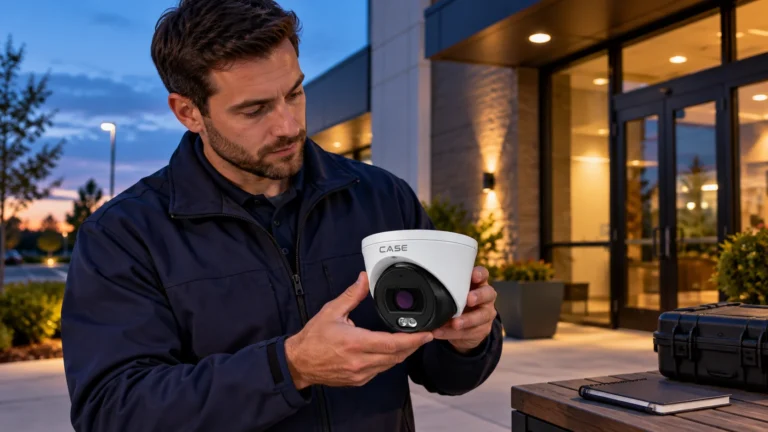
Quick answer: The CS-I8WS SD-2.8mm lists up to 15m white light and 50m IR, while the CS-I8US I-2.7-13.5mm lists up to 30m white light and 80m IR. The S and TS counterparts do not inherit those white-light rows. Choose by the measured target zone, lens, actual night detail and operating temperature. An illumination distance is not an identification or full-color performance guarantee.
On this page
What changed versus the S and TS versions?
Keep the full suffix in the camera schedule. The catalog prints different illumination and environmental rows for S/SD and a US-only white-light entry on the shared TS/US page. Those identifiers are not interchangeable evidence for every feature; compare the actual printed rows and applicable revision before a commitment:
| Printed row | CS-I8WS S-2.8mm | CS-I8WS SD-2.8mm | CS-I8TS I-2.7-13.5mm | CS-I8US I-2.7-13.5mm |
|---|---|---|---|---|
| Series | Sharp | Sharp | Intelligent | Intelligent |
| White Light Distance | N/A | 49 ft (15 m) | Not specified for TS; the 30 m row is marked CS-I8US Only | 98 ft (30 m) |
| Max. IR Distance | 164 ft (50 m) | 164 ft (50 m) | 262 ft (80 m) | 262 ft (80 m) |
| Operating Conditions | −40 °F to 149 °F (−40 °C to 65 °C) | −31 °F to 149 °F (−35 °C to 65 °C) | −31 °F to 149 °F (−35 °C to 65 °C) | −31 °F to 149 °F (−35 °C to 65 °C) |
The other shared/paired catalog rows cover sensor, lens, image format, WDR, audio/alarm, memory, codec, protection and housing as shown. Use the IP camera user manual and applicable model/revision sheet to confirm actual modes, supported functions and installation limits; a shared page or similar housing is not a completed compatibility test. Two points matter for the quote:
- Cold rating: the S model prints −40°C to 65°C; the SD prints −35°C to 65°C. Compare the actual site and supplied revision’s startup, humidity and other limits rather than selecting solely on one operating-temperature figure. The S page lists white light N/A; do not transfer the SD’s 15 m entry to it.
- Shared page. The CS-I8TS I-2.7-13.5mm and CS-I8US I-2.7-13.5mm share one catalog page. The white-light row prints 98 ft (30 m) marked for the CS-I8US I-2.7-13.5mm only, so make no white-light claim for the CS-I8TS I-2.7-13.5mm. The 2027 Q1 minimum illumination on that page is 0.002 Lux; confirm it on the spec sheet.
Use the exact SKU’s low-light and illumination rows and current model sheet. Do not transfer a NightBright, PhotonX or full-color claim from a similar letter variant or a generic family icon. Confirm available illumination modes, exposure, moving-detail performance and the owner’s lighting limits on site.
When does white light help, and when is IR the better choice?
Compare the two models’ printed IR and white-light entries with the actual task. Visible illumination may help capture useful color within a tested zone, while the available modes and recorded result depend on exposure, target movement, reflectance, lens and site lighting. The longer IR row does not establish identification distance, and the white-light row does not guarantee usable color across the whole scene.
Jobs where white light earns its place
- Entrances and doors: verify the actual clothing/face-detail task at the proposed distance, height, lens setting and exposure. Do not turn a general example into a guaranteed identification range.
- Parking rows and drive aisles: vehicle color, which is often the first detail an investigator asks for.
- Loading docks and yard gates: color on the vehicle and the person at the point of entry.
- Poorly lit sites: evaluate whether the supported camera light provides the required recorded detail in the agreed zone, with acceptable glare, spill and owner/site restrictions; do not assume it replaces the full site-lighting design.
Where to hold back
- Neighbors and roads: a light aimed at a residence, a window or oncoming drivers causes complaints and glare; local lighting ordinances may apply, so verify the local code.
- Insects and webs: inspect the actual lens/illuminator area and plan cleaning from the observed site conditions. Contamination, reflections and nearby objects can affect the image; record the maintenance responsibility.
- Long views: do not promise useful color or identification beyond the zone demonstrated in the actual scene. A quoted illumination distance is not a sharp cutoff or a substitute for testing with the required subject and available lighting.
- Warning task: white LEDs, an audio port or a family label do not establish an automatic warning sequence. Obtain the actual model’s supported triggers, light/audio modes, client path and permitted site procedure before including a warning workflow.
Use the active deterrence guide to distinguish an agreed warning task from simply adding visible light. Confirm the exact camera’s supported modes, triggers and control method in applicable-revision documents, then agree and test the actual settings with the owner. Do not infer an EW/AEW or audio-warning workflow from a white-light row alone.
How do you plan the 49 ft (15 m) and 98 ft (30 m) white-light zones?
The printed distance is the reach of the light, not an identification distance. Plan in three steps:
- Mark the target zone. Pick the door, aisle or gate where color matters and measure its distance from the planned mount.
- Match the lens and illumination to the zone. The SD lists 15m white light with a fixed 2.8mm lens; the US lists 30m with a 2.7–13.5mm lens. These are planning inputs, not proof of readable faces or color at the far limit. Test the actual target at night.
- Check pixel density at the target. Both are 8MP at 3840×2160; the lens and the target distance decide the pixels per foot. Use the method in the field of view and lens calculator; field-of-view angles come from the spec sheet.
Keep reflective surfaces, such as a wall or soffit, out of the bottom of the image so the light does not wash out the scene, and check the image at night before you leave the site.
Which AI does the CS-I8US I-2.7-13.5mm print?
Use the camera/NVR analytics guide to distinguish camera-generated functions from recorder-side processing and search. The two catalog model entries have different printed AI lists; neither list establishes simultaneous capacity, every event/client path or a safety/compliance approval. Confirm the exact supported task and integration:
- CS-I8WS SD-2.8mm (Sharp): Human & Vehicle Classification, Tripwire, Perimeter.
- CS-I8US I-2.7-13.5mm (Intelligent): Human/Vehicle/Non-motor Vehicle/Pet (Cat, Dog) Classification, Tripwire, Double Tripwire, Perimeter, Object Abandon, Object Missing, Heatmap, Loitering, Running, Parking, People Counting, Crowd Detection, Safety Helmet Detection, On Duty Detection, Video Abnormal, Audio Abnormal.
Match a listed function to the actual approved task and test it on the supplied camera, NVR, firmware and client. A helmet, parking or counting label does not replace a required safety process or establish accuracy at the site. The US entry prints audio I/O 1/1 and alarm I/O 2/1; the SD prints N/A for those interfaces. Both list Built-in Microphone: Yes and Built-in Speaker: N/A. Use the audio recording laws checklist for planning and obtain the actual site-specific privacy review before enabling listening or recording; an interface does not prove a talk-down or warning workflow.
Spec table: the new white-light bullets as printed
| Printed row | CS-I8WS SD-2.8mm | CS-I8US I-2.7-13.5mm |
|---|---|---|
| Series | Sharp | Intelligent |
| Image Sensor / Lens | 8MP / 2.8mm Fixed | 8MP / 2.7mm – 13.5mm |
| Max. Resolution & Frame Rate | 3840×2160@20fps | 3840×2160@30fps |
| Max. IR Distance | 164 ft (50 m) | 262 ft (80 m) |
| White Light Distance | 49 ft (15 m) | 98 ft (30 m) |
| Min. Illumination | 0.002 Lux | 0.002 Lux |
| Wide Dynamic Range | 120dB | 120dB, True WDR (TWDR) |
| Audio I/O / Built-In Microphone | N/A / Yes | 1/1 / Yes |
| Alarm I/O | N/A | 2/1 |
| Memory Slot | 512 GB | 512 GB |
| Video Compression | S+265/H.265/H.264B/H.264M/H.264H/Motion JPEG | S+265/H.265/H.264B/H.264M/H.264H/Motion JPEG |
| Protection / Housing | IP67 / Metal | IP67 / Metal |
| Operating Conditions | −31 °F to 149 °F (−35 °C to 65 °C), 0~95% RH | −31 °F to 149 °F (−35 °C to 65 °C), 0~95% RH |
The pages list a metal housing; verify the photographed finish and supplied revision separately. Obtain power draw for supported illumination modes, field-of-view angles and control options from the current model sheet. Size the PSE allocation from the documented maximum supported load, including cable loss; do not assume IR and white light can run together at full output.
Installation and commissioning checklist
- Write the full SKU on the camera schedule; CS-I8WS S-2.8mm and CS-I8WS SD-2.8mm differ in white light and cold rating.
- Confirm the white-light zone at night from the mount position, with the owner present if neighbors are close.
- For the CS-I8US I-2.7-13.5mm, follow the documented zoom/focus adjustment method and check the actual day/night scene. A focal range alone does not establish remote motorized control or identical focus under every mode.
- Configure only the AI rules the customer asked for, walk-test each one and record the result.
- Add and test the exact camera with the intended CASE NVR and firmware; do not assume plug-and-play, event handling or every illumination control. A printed ONVIF profile is not a blanket compatibility promise. Where conformance is required, check the exact model and firmware in the official ONVIF database, then test the required live view, recording, playback and event functions with the actual client/version.
- For projects with NDAA or other compliance requirements, ask Anabon for the approved per-SKU documentation before the bid goes out.
Compare IP cameras for installers using complete SKUs, actual framing, night task and applicable power/environment documents. A collection listing or account access does not establish stock, camera/NVR compatibility or a demonstrated color result.
What to tell your customer
Suggested customer wording, subject to the agreed scope: We will confirm the supplied variant and test the actual color/detail task, exposure, lighting modes, glare and neighboring-property limits at night. We will document the agreed settings, results and maintenance requirements. The proposal will identify the complete model and written service terms; an illumination distance alone does not establish color or identification performance.
FAQ
What is the difference between the CS-I8WS S-2.8mm and the CS-I8WS SD-2.8mm?
The current SD page prints 15 m white light and−35°C lower operation, while the S page prints white light N/A and−40°C lower operation. Other paired rows match as shown, but choose from the actual scene and complete supplied-revision limits, including startup and required recorded detail. Do not select a model from one illumination or temperature number alone.
Does the CS-I8TS I-2.7-13.5mm have white light?
The shared catalog page prints 30 m with the annotation CS-I8US Only. That supports the stated US-row comparison, not a white-light commitment for TS or every possible revision. Obtain the complete current model sheet and verify the actual supported modes, power and required night detail before specifying either variant.
Will white light give color video across the whole scene?
Use the field of view and lens calculator when planning the actual framing and subject detail, then test the recorded result. The white-light figure is an illumination reference, not a guarantee across the whole scene. Ambient light, exposure, lens setting, movement and reflectance affect the result; retain the required night-test and acceptance record.
Are these white-light bullets deterrence cameras?
These catalog rows do not establish an approved active-warning workflow. If the job needs a rule to trigger light or audio, obtain explicit support for the complete SKU, firmware and client, including any required external interface. A white-light row, microphone or generic EW family message is not enough to promise that sequence or prevention of an incident.
What warranty applies to these cameras?
Current physical pages 23 and 29 show six-year camera badges for the featured entries. Use the warranty-by-category guide as context, then confirm the supplied SKU/revision, written order term, exclusions and claim route. Start through the supplying installer/dealer and obtain actual return authorization. The badge does not define separate onsite service or every customer’s eligibility.
References
- Current CASE catalog and revision-specific manuals
- Confirm a model, configuration or integration
- ONVIF Conformant Products database