Quick answer: When a customer says they found it cheaper online, they are almost always comparing a box with your installed, documented and supported system. With a channel-protected line such as CASE, the line’s pricing does not appear publicly, so the listing in their hand is usually a different product or a different scope. Answer with scope and value, meaning warranty through you, documentation, support, installation and maintenance, and never by racing the online number.
What is the customer actually comparing?
Ask for the link before you answer anything. Very often the listing is not the same thing you quoted. It may be a different model with a similar name, a kit sold without a recorder that fits the site, or a camera with the same megapixel count and a very different night image, housing or analytics row. Even when the hardware matches, the listing covers only the hardware. Your quote covers the job.
Put the two side by side, line by line, in front of the customer. Most of the time the comparison ends by itself.
| Line | Online listing | Your quote |
|---|---|---|
| Site survey and design | None; the buyer guesses camera positions and lenses | Positions, lenses and recorder sized for the site |
| Cable and pathway | Not included | Runs, pathway, weatherproof entries and labeling |
| Configuration | Buyer’s problem | Bench-tested, network set up, recording schedule and alerts tuned |
| Remote access handover | App download, no setup | CASE Connect set up and shown to each user |
| Warranty handling | Whatever the seller offers, often shipped back at the buyer’s cost and time | Handled by you, supported by Anabon behind the scenes |
| Documentation | Product listing page | Spec sheets, as-built drawing, camera schedule and, where required, compliance documentation |
| Follow-up and maintenance | None | Follow-up calls and an optional service agreement |
The point of the table is not to make the listing look bad. It is to show the customer that they were comparing a part of your quote with the whole of it.
Why does a channel-protected line make this objection rarer?
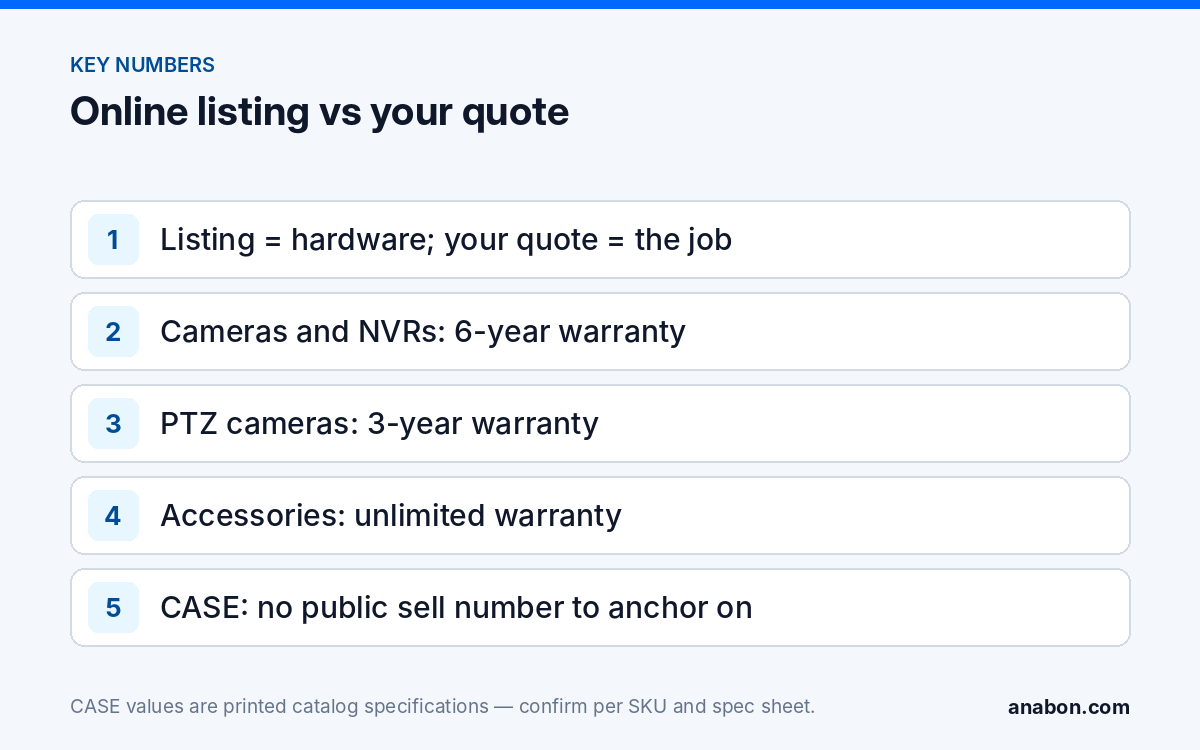
With many lines, the customer can type the model number into a search bar and find a sell number in seconds. That number becomes the anchor for everything you say next. CASE is built the other way around. CASE is a channel-protected line. CASE pricing does not appear publicly; you quote from private pricing behind login or a direct quote, so your customer only sees your number.
Two more things support you here. Anabon is strictly B2B and never sells to your customer, so there is no direct channel quietly competing with your quote. And support, warranty and project help flow through you, so the customer relationship stays yours after handover. Public price is not your price.
If a customer does show you a public listing for a CASE SKU, do not argue with it in the meeting. Note the link and send it to Anabon so it can be reviewed against the channel policy. Then go back to the scope comparison, because that is the conversation you can win. How quoting from your business account works is covered in private pricing explained.
What is the value answer: warranty, documentation and support?
Warranty, stated exactly and through you
Say it the same way every time, by category: CASE cameras and CASE NVRs carry a 6-year warranty. CASE PTZ cameras carry a 3-year warranty. CASE accessories carry unlimited warranty. Hard drives are supported through back-to-back manufacturer warranty. Then explain the route: the customer calls you, and Anabon supports you behind the scenes through the approved warranty process. Never round it up to “six years on everything”; the PTZ and hard-drive terms are different, and a customer who later finds the difference stops trusting the rest of the quote.
Documentation the listing does not come with
Every CASE SKU has a published specification sheet. If the site has an insurer, landlord or public-sector requirement, CASE offers NDAA-compliant options for compliance-sensitive projects. Anabon confirms the exact products and provides the official compliance documentation for each project. A marketplace listing does not hand the customer a document they can file with a procurement office or an insurer.
Support that has a name
Anabon supports installers, integrators, dealers, and approved business accounts with CASE product distribution, technical support, warranty coordination, and project guidance. For the customer, that means one phone number, yours, for configuration questions, a failed camera or a new user who needs remote access.
Installation and maintenance
Your labor, your liability and your follow-up are the largest part of the value, and they are invisible in a listing. Name them in the proposal as their own sections so the customer sees them before the objection, not after. The proposal template shows a section layout that does this.
What do you say when the customer pushes back? A script
Keep it calm and short. The goal is a fair comparison, not winning an argument.
- Acknowledge. “That makes sense to check. Can you send me the link so we compare the same thing?”
- Clarify the product. “Is it the same model number, including the letters after the dash? One letter can change the housing, the night image and the analytics.”
- Clarify the scope. “Does it include the recorder, cable, mounting, setup and the app on your phones, or just the cameras?”
- Walk the table. Go line by line through survey, cable, configuration, CASE Connect handover, warranty handling, documentation and follow-up.
- Restate the warranty route. “If a camera fails in year four, you call me, and I handle it. CASE cameras and CASE NVRs carry a 6-year warranty, and it runs through us.”
- Offer scope options, not a lower rate. “If the total is the concern, we can phase it: the entrances and the lot now, the interior next quarter.”
- Close on the decision. “Which version would you like me to put in writing?”
“The listing is a box. My quote is a working system with a name on it, mine, and a warranty that runs through me. If we need to change the total, let’s change the scope, not the quality of the job.”
If the customer still wants to supply their own hardware, set written terms: what you will install, that you cannot support warranty on equipment you did not supply, and the hourly rate for diagnosing problems with it.
What should you never do with your quote?
- Never match the online number. Once you drop the total to follow a listing, every future quote to this customer starts from a price race you have already lost.
- Never strip the value lines to hit a target. Removing documentation, configuration time or follow-up visits turns a supported system into the box they found online.
- Never criticize the seller or the other product. Describe what your quote includes; let the customer draw the conclusion.
- Never reveal your cost. Your account numbers are private by design; showing them invites a negotiation over your margin.
- Never post CASE numbers on your website or in an ad. That breaks the channel protection that keeps this objection rare.
- Never promise what is not documented. Night performance, analytics and app features are confirmed per model, firmware, software version and project configuration.
How do you prevent the objection before it comes up?
Most “found it online” moments are set up by the quote itself. A quote that lists each camera with its own unit number invites a per-item search; a quote built in sections invites a comparison of outcomes.
- Quote in sections: design, equipment, installation, configuration and handover, documentation, follow-up.
- State the warranty by category in the proposal, with the route through your company.
- Mention during the survey that the line you install is channel-protected and supported through you.
- Show the customer one night clip or deterrence demo from a similar site; outcomes are harder to compare with a listing.
- Offer a service agreement so the relationship is visibly ongoing.
For the labor and margin side of the quote, see how to quote installation.
What to tell your customer
“What you found online is the hardware. What we quote is the system: design, installation, configuration, documentation and the support afterward. CASE cameras and CASE NVRs carry a 6-year warranty, and if anything fails, you call us and we handle it. If the total needs to move, let’s adjust the scope together rather than the quality of the work.”
FAQ
Should I match an online listing to keep the job?
No. Matching the number teaches the customer that your quote was padded and sets the starting point for every future job. Compare scope line by line instead, and if the total is the real concern, offer a phased scope or fewer cameras now. Keep the value lines, such as configuration, documentation and follow-up, in every version.
Why would a customer rarely find CASE sell numbers online?
Because CASE is a channel-protected line. CASE pricing does not appear publicly; you quote from private pricing behind login or a direct quote, so your customer only sees your number. If a customer shows you a public listing for a CASE SKU, send the link to Anabon so it can be reviewed against the channel policy.
What if the customer wants to buy the hardware and have me install it?
Decide your policy before it comes up and put it in writing. Many installers accept it with clear terms: an hourly or per-device installation rate, no warranty support on equipment they did not supply, and a separate rate for diagnosing problems with that hardware. Make sure the customer understands warranty claims then go to the seller, not to you.
How do I explain the warranty without overstating it?
Use the category wording every time: CASE cameras and CASE NVRs carry a 6-year warranty. CASE PTZ cameras carry a 3-year warranty. CASE accessories carry unlimited warranty. Hard drives are supported through back-to-back manufacturer warranty. Then add the route: the customer contacts you, and Anabon supports you behind the scenes.
Does this script work for service agreements too?
Yes. When a customer compares your agreement with a lower remote-only offer, use the same steps: ask what exactly is included, compare visits, firmware updates, health checks, response times and documentation line by line, and adjust the scope of the agreement rather than lowering the rate for the same scope of work.